The Rise of AI-Powered Design Exploration in Architecture

.jpg)
The Rise of AI in Architecture: How Design Exploration Actually Changed
The early-stage design process used to be a grind.
Sketch concepts. Mood board them. Build rough 3D massing studies. Present three options. Wait for feedback. Iterate. Repeat. A design exploration that should take a week took three.
Now architects are compressing that to hours. Not days. Hours.
.png)
This isn't hype. 46 percent of architects are using some form of AI in their workflows. The speed is real. But there's a trade-off nobody's talking about openly enough — speed versus precision. That's the actual story here.
.png)
What changed
The pre-visualization phase used to consume massive time. You'd sketch concepts, build rough models, assemble mood boards, generate massing images, present three directions. Each step had friction. Building a massing study in Rhino takes hours. Rendering it, even at low fidelity, takes more. Then you revise. Again. Again.
A full design exploration — three distinct directions, validated through mood boarding and basic 3D visualization — realistically took five to seven days. Sometimes two weeks if stakeholder feedback dragged it out.
Now that same work happens in about two hours.
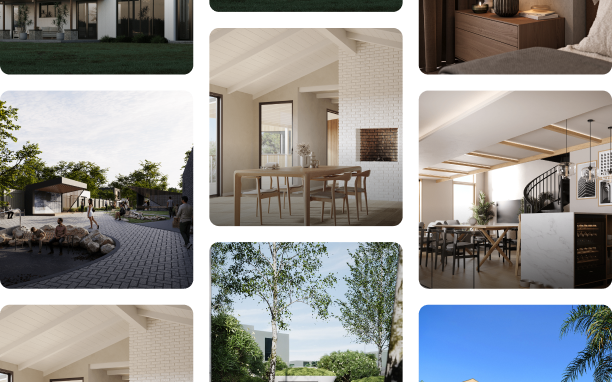
The process is concrete. You take a base 3D model or sketch, define the design direction through text prompts and reference images, feed those into tools like NanoBanana or Flux, and generate 8 to 12 conceptual variations. Not pixel-perfect production renders. Rapid explorations that show the client what the space could feel like under different aesthetic directions.
The same work that used to require a conceptual artist spending two days on mood boards now happens in a couple of hours. And the variations are often more refined visually than what a rushed 2D board would have produced.
The tools
Most architects are landing on one or two and sticking with them.
We use NanoBanana for most of our pre-viz work. You feed it a base image or partial render, prompt it with the design direction, and it outputs photorealistic architectural images. It hallucinates sometimes. It struggles with complex geometry. But for massing studies and material exploration it's reliable enough that we keep coming back to it.
Flux when we need something more flexible. It handles full renders well if your prompt is tight. Autodesk Forma if massing exploration needs to happen early and at scale — it's less about photorealism and more about generating feasible design variations fast.
The others — Maket, Veras — are out there and have their use cases. We just haven't needed them enough to switch.
None of these are replacing CAD. They're sitting alongside it, handling the exploration phase so the team can spend more time on refinement.
The trick that actually works
Something we've found that works surprisingly well for pre-viz workflows is selective inpainting. Instead of feeding an entire 3D render to an AI tool, you crop specific elements — the interior walls, the materials, the lighting scenario — save them separately, and feed each component in individually.
Why? Because the AI handles smaller, more focused visual problems better. It gets the color relationship right. It nails the material finish. And because you're working with portions of a validated 3D model as the foundation, the proportions and structure stay correct while the aesthetic details improve.
Is it a workaround? Sure. But it produces higher quality pre-viz images than a straightforward full-render approach. And for early-stage design exploration, quality matters. Stakeholders need to believe in the direction enough to commit design time to it.
The trade-off nobody's talking about clearly enough
AI design exploration is genuinely fast. But it's not precision-first.
An AI-generated rendering might miss structural details. It might hallucinate architectural elements that don't exist. It might nail the material aesthetic but get the window-to-wall ratio subtly wrong. These aren't dealbreakers for early exploration. They're often invisible at that stage.
But they matter when clients start believing in the direction. You show them an AI-generated massing study with beautiful lighting and material richness. They love it. They greenlight it. Then detailed design begins and suddenly you're solving for structural realities the AI glossed over.
We've seen projects where stakeholders fell in love with AI-generated concepts that were structurally infeasible once you actually modeled them in detail. The AI just didn't understand the constraints.
Smart teams use AI for direction and speed, then validate feasibility with detailed 3D modeling before showing anything to external stakeholders. The AI exploration answers what if. The detailed modeling answers is this actually buildable.
Speed and precision aren't mutually exclusive. But they require different tools, and teams need to know which phase they're in.
.png)
The woodworker analogy
Think of it like hiring a custom woodworker for a table. Previously you'd walk through specs, sketch options, see samples. Then they'd build.
With AI tools you show the woodworker 15 variations in an afternoon. Different leg styles, finishes, proportions, wood species. You validate direction. You confirm what you actually want. Then they build one table, precisely, to spec. Because you've already explored thoroughly enough to know what works.
That's what AI design exploration does in architecture. You explore aggressively upfront. You burn through variations. You find the direction that resonates. Then you commit development resources to refinement, confident you're solving the right problem.
It's not about AI replacing architects. It's about architects using AI to be smarter about where they spend their detailed design time.
.png)
The honest limitations
AI design tools aren't magic. They struggle with problems human designers handle instinctively. Complex structural relationships. Precise proportions. Architectural details that need to actually work in the real world.
This isn't a criticism. It's a realistic assessment of what the tools are good at and where human judgment is irreplaceable. The best teams are the ones who know the difference.
How this is actually changing practice
Architecture firms are restructuring around these tools. The conceptual design phase, which used to be 10 to 15 percent of a project's design time, is shrinking. Architects spend less time on mood boarding and massing exploration because they're doing it with AI.
That time is getting reallocated to detailed design, client collaboration, and refining what works. Some firms are expanding their design exploration, showing clients more options and testing more variations, because the cost of exploration has dropped so dramatically.
It's not that architects are working less. It's that they're working differently. The parts of design that benefit from iteration are faster. The parts that benefit from deep thinking and precision are getting more attention.
AI in architecture isn't about taking the designer out of design. It's about taking the friction out of exploration.
The professionals winning right now are the ones who see AI as a tool that makes their thinking faster, not one that replaces their thinking. If you're resisting these tools because they're not real design, you're missing the point. If you're adopting them without understanding their limitations, you're building on shaky ground.
The middle path is where the good work is.